It’s common to Upload a video file using HTML form. But, uploading a video with Progress Bar is the most important feature of the dynamic web application. The video file upload functionality can be easily implemented using PHP. When you use PHP to upload a file, the page is usually refreshed. But, javaScript and Ajax can be used to upload video or images without refreshing the page.
The Progress Bar is highly useful for showing the upload progress in a human-readable format. A progress bar is a graphical feature that captures the status of an operation. A progress bar is typically used to view a percentage representation of progress for upload, download, or installation. This tutorial will clearly show How to upload video with a progress bar in PHP.
First we will create a HTML form to upload video with progress bar functionality.
Create index.php file
In this form, we have file input and progress bar to show the progress of the upload file.
Uploading video with a progress bar
Add Ajax JavaScript which handles “real time” progress
The following javaScript code sends data from the selected file to the server-side script without reloading the page.
Create upload.php file to handle video upload using AJAX
The upload.php file is called to handle the process of uploading the file with PHP by the Ajax request.
So now we will also create “uploads” folder under current working directory to upload the files.
Note:Make sure you have an uploads folder,
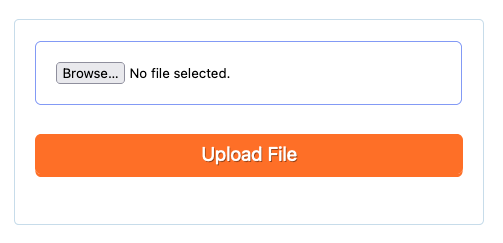
Now we will add some CSS style to make form presentable
After adding above CSS your form will look like below screenshot.
Complete code
Use the below complete code to upload a video file with a progress bar using PHP and JavaScript.
Uploading video with a progress bar
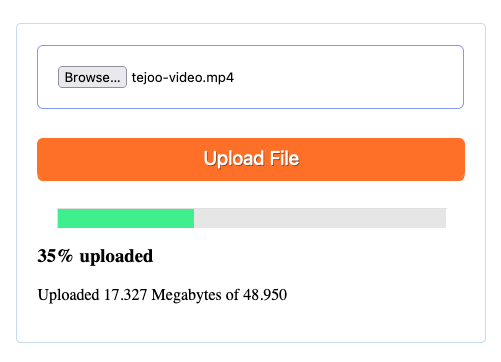
It's done. Now just open your index.php file in your browser and upload the video file. You will get below screenshot on uploading video with a progress bar.
Are you want to get implementation help, or modify or extend the functionality?
Thanks for reading 🙏, I hope you found How to upload video with a progress bar in PHP tutorial helpful for your project. Keep learning!. If you face any problem – I am here to solve your problems.
Pradeep Maurya is the Professional Web Developer & Designer and the Founder of “Tutorials website”. He lives in Delhi and loves to be a self-dependent person. As an owner, he is trying his best to improve this platform day by day. His passion, dedication and quick decision making ability to stand apart from others. He’s an avid blogger and writes on the publications like Dzone, e27.co
This website uses cookies to improve your experience. We'll assume you're ok with this, but you can opt-out if you wish. Cookie settingsACCEPT
Privacy & Cookies Policy
Privacy Overview
This website uses cookies to improve your experience while you navigate through the website. Out of these cookies, the cookies that are categorized as necessary are stored on your browser as they are essential for the working of basic functionalities of the website. We also use third-party cookies that help us analyze and understand how you use this website. These cookies will be stored in your browser only with your consent. You also have the option to opt-out of these cookies. But opting out of some of these cookies may have an effect on your browsing experience.
Necessary cookies are absolutely essential for the website to function properly. This category only includes cookies that ensures basic functionalities and security features of the website. These cookies do not store any personal information.
Any cookies that may not be particularly necessary for the website to function and is used specifically to collect user personal data via analytics, ads, other embedded contents are termed as non-necessary cookies. It is mandatory to procure user consent prior to running these cookies on your website.